Email Management Software for Outlook & Microsoft 365
SharePoint and Office 365 email management — directly inside Outlook.
harmon.ie is an email and information management software for Outlook that helps teams save emails and attachments to SharePoint, Teams, and OneDrive, with automatic metadata capture and clear saved status.









Important emails are trapped in personal inboxes
Every organization runs on email. Contracts, approvals, client correspondence, project updates — they all flow through Outlook. But when those emails stay in personal folders, the problems start:
- Teams lose context. A colleague goes on leave and their inbox goes with them. Project history is scattered across mailboxes no one else can access.
- Duplicates multiply. The same email gets forwarded, saved to different folders, and filed under different names — with no single source of truth.
- Finding anything takes too long. Outlook search works for your inbox, but not across the organization. Emails that were never moved to SharePoint or Teams are invisible to everyone else.
- Compliance becomes guesswork. Without structured storage and metadata, there's no reliable way to find, retain, or produce emails when auditors or legal teams come asking.
The core issue isn’t that people don’t want to organize email — it’s that the tools make it too hard. Switching between Outlook and SharePoint, manually entering metadata, remembering where to file what — it’s friction that nobody has time for.
harmon.ie brings SharePoint, Teams, and OneDrive into Outlook
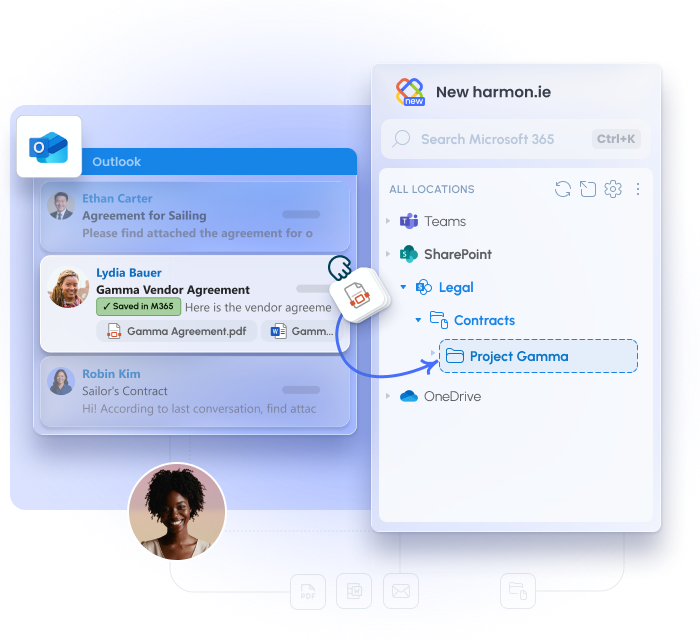
harmon.ie adds a sidebar to Outlook that gives you direct access to your Microsoft 365 locations — SharePoint sites, Teams channels, and OneDrive folders. From there, saving an email is a drag-and-drop or a single click.
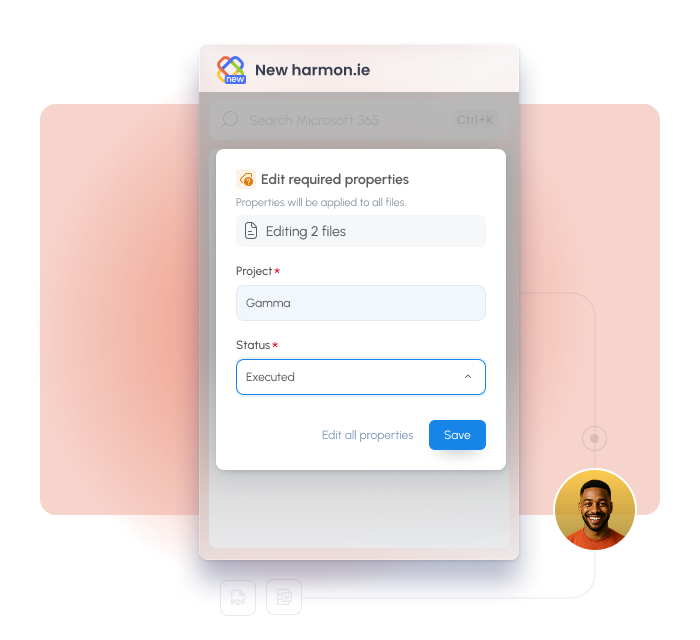
When you save, harmon.ie automatically maps email headers (To, From, Subject, Date) into SharePoint metadata columns and creates an Email view so saved emails are searchable and filterable — without anyone typing a single metadata field.
Emails stay in Microsoft 365 where your governance policies already apply. harmon.ie never stores your data — it’s a client-side application that connects Outlook directly to your tenant.
Outlook Email Management Features
Save emails and attachments from Outlook
File emails to SharePoint, Teams, or OneDrive directly from your inbox — no browser switching required.
- Drag-and-drop from your inbox into the sidebar
- Save & Send files outgoing emails at the moment you hit send
- Choose what to save: email and/or all attachments or specific attachments
Automatic metadata from email headers
Every saved email is tagged automatically — no manual data entry required.
- harmon.ie maps To, From, Subject etc. into SharePoint metadata columns on save
- An Email view is created in the library, displaying saved emails in a grid so anyone can see who sent what and when
- Sort, filter, and search by sender, recipient, subject, or date — without opening each file
Share files from SharePoint, Teams, and OneDrive
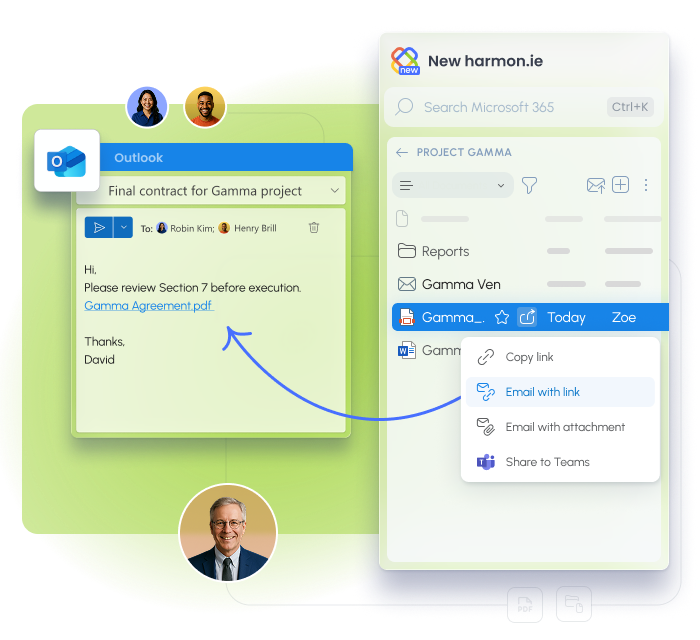
Attach files from Microsoft 365 to an Outlook email directly from the sidebar — as a link or a traditional attachment.
- Share as a secure link so recipients always see the latest version — no duplicate copies
- Share as a physical attachment when recipients need the file itself, not a link
- Share directly to a Teams conversation from the sidebar without switching apps
Search across Microsoft 365
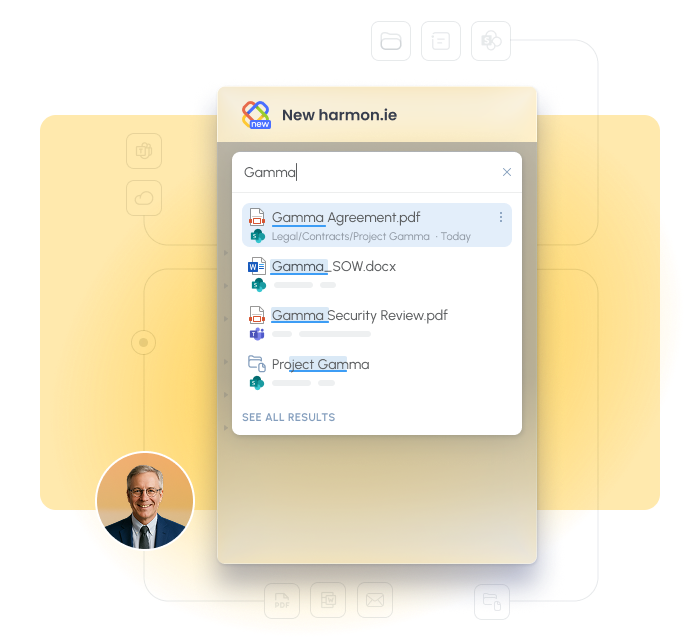
Find any email or document across your entire Microsoft 365 environment from a single search bar in Outlook.
- Search across SharePoint sites, Teams channels, and OneDrive folders simultaneously or within a specific location
- Filter results by app (SharePoint, Teams, OneDrive), file type (email, Word, Excel, PDF)
- COMING SOON: Copilot-powered search — ask in plain language and get the right file, email, or content instantly (New harmon.ie)
Know what's been saved
See at a glance which emails have been filed and where—right from your inbox.
- Instantly see which emails were saved
- See where each email was saved
- COMING SOON: Shared categories. When one user saves an email, all recipients can see it (New harmon.ie)
Automate email filing
Remove manual steps from recurring email workflows.
- Drop folders link any Outlook folder to a SharePoint or Teams location — any email placed there is saved automatically with metadata. Combined with Outlook rules that route emails by sender, domain, or subject, this enables fully hands-off filing for predictable workflows (harmon.ie Classic)
- COMING SOON: automatic email thread saving — every email in a thread is captured, not just the ones users remember to file (New harmon.ie)
- COMING SOON: automated email filing based on user behavior, rules, and AI integration (New harmon.ie)
Why organizations choose harmon.ie for Outlook email management
Works where your team already works
harmon.ie runs inside Outlook — the application your team uses all day. There’s no new interface to learn, no app to switch to, no change in workflow. Users save emails the same way they’d move a file: drag and drop.
“Adoption was smooth. We didn’t do any training.” — Cesare D’Amico, IT Manager, DRASS
Built for compliance from day one
Emails saved through harmon.ie land in Microsoft 365 where your retention labels, sensitivity labels, and governance policies already apply. Metadata is captured automatically — so when auditors or legal teams ask for records, they’re there, structured, and findable. No retroactive cleanup required.
Effective email management in Microsoft 365 requires more than personal folders — it requires structured, shared workflows.
Less time filing, more time working
When saving an email takes a drag-and-drop instead of a five-step process, people actually do it.
harmon.ie removes the friction that causes email management to break down — and the results show: Bosch measured a 70% improvement in email management efficiency across 360,000 users.
Works across every Outlook version
New harmon.ie supports Outlook for Windows (new Outlook), Outlook for Windows (classic), Mac, and Web.
Migrating to the new Outlook? harmon.ie works on both sides of the transition — read our New Outlook vs Old Outlook guide.
Proven at enterprise scale
Bosch deployed harmon.ie to 360,000 users and measured a 70% improvement in email management efficiency.
ESDC Canada migrated 32,000 employees to Microsoft 365 in three months using harmon.ie for email filing. These aren’t pilots — they’re full-scale, production deployments.
Your data never leaves Microsoft 365
harmon.ie is a client-side application — no server, no backend, no external storage.
Emails go directly from Outlook to your SharePoint, Teams, or OneDrive tenant. harmon.ie never sees or stores your content. ISO 27001 certified.
See harmon.ie’s security page.
Migrating to the New Outlook?
Microsoft is transitioning organizations to Outlook for Windows (the new Outlook). Because harmon.ie works across Outlook versions, teams can continue managing emails, documents, and metadata as they move to the new client.
👉 Read our guide:
New Outlook vs Classic Outlook: What Organizations Need to Know

Outlook Email Management — FAQ
What is email management software for Outlook?
Email management software for Outlook helps teams save, organize, and retrieve important emails so they’re accessible to everyone who needs them — not just the person who received them. harmon.ie does this by saving emails from Outlook into SharePoint, Teams, and OneDrive with automatic metadata, making them searchable and governed.
How does harmon.ie save emails to SharePoint?
Open the harmon.ie sidebar in Outlook, navigate to the SharePoint library or folder where you want the email, and drag the email from your inbox into the sidebar. harmon.ie saves the email and maps its headers (To, From, Subject, Date) into SharePoint columns automatically. You can also use Save & Send for outgoing emails.
Can I save Outlook emails and attachments separately?
Yes. When saving an email with attachments, harmon.ie shows a simple checklist — check the email, the attachments you want saved, or all. Only what you select gets saved.
Does harmon.ie work with the new Outlook?
Yes. New harmon.ie works on Outlook for Windows (new and classic), Outlook for Mac, and Outlook on the Web. harmon.ie Classic works on Outlook for Windows (classic). Both are included in a single license, so teams migrating to the new Outlook can use both during the transition.
How does automatic metadata tagging work?
When you save an email, harmon.ie reads the email headers — To, From, Subject, Date, and whether it has attachments — and writes them into SharePoint metadata columns. It also creates an Email view in the library that displays these columns in a grid, so saved emails are immediately sortable and filterable without any manual data entry.
Can I automate email filing with Outlook rules?
How do I find a saved email later?
- Use harmon.ie’s search to find emails across all SharePoint sites, Teams channels, and OneDrive folders from one search bar in Outlook. Filter by app, file type, or specific location. Within a library, use the Email view to sort by sender, recipient, subject, or date.
How do I share a SharePoint file from Outlook?
In New harmon.ie:
- Open the harmon.ie sidebar in Outlook.
- Find the SharePoint, Teams, or OneDrive file you want to send by email.
- Hover over the file and click Share > Add as link or Add as attachment.
In harmon.ie Classic:
- Open the harmon.ie sidebar in Outlook.
- Find the SharePoint, Teams, or OneDrive file you want to send by email.
- Drag and drop the file into an email message to attach a secure link. Hold the Alt key when dragging the file if you want to send a physical attachment.
How do I save sent Outlook emails to SharePoint, Teams, or OneDrive?
In New harmon.ie:
- Click the Save & send button above the recipients line in your email.
- harmon.ie opens. Hover over the location where you want to save the email and click Save & send.
In harmon.ie Classic:
- Click the Save on Send icon in harmon.ie’s ribbon button.
- Send your email.
- The Save to Microsoft 365 dialog opens, allowing you to select the location where you want to save the email.

Industry
Location
Number of employees
Case Study


Industry
Location
Number of employees
Case Study


Industry
Location
Number of employees
Case Study


Industry
Location
Number of employees
Case Study

Helpful resources