

The New harmon.ie 1.5 release continues to focus on making email and document management in Outlook faster, clearer, and more intuitive—especially for organizations working across Microsoft 365.
This version introduces two major improvements: Enhanced drag-and-drop support across all Outlook apps and automatic email categorization for emails saved to Microsoft 365.
Improved Drag and Drop Support Across All Outlook Apps
Saving emails and attachments should be quick and effortless—regardless of which Outlook app you’re using.
With version 1.5, drag and drop is now fully supported across all Outlook environments, including:
-
Outlook for Windows (New and Classic)
-
Outlook on the web
-
Outlook for Mac
You can now drag an email or attachment directly from your inbox and drop it onto the relevant SharePoint, Teams, or OneDrive location in the harmon.ie sidebar.
This makes saving content feel natural and consistent, especially for users transitioning to New Outlook, where traditional add-in workflows often change.
See how this works
Watch this short training video to see how you can save emails and attachments to Microsoft 365 with New harmon.ie.
Automatic Email Categories for Saved Emails
One of the biggest challenges with saving emails to Microsoft 365 is knowing what’s already been saved—and where.
New harmon.ie 1.5 solves this with automatic email categories.
When an email is saved to Microsoft 365, harmon.ie automatically applies:
-
A Saved in M365 category
-
A location category showing where the email was stored
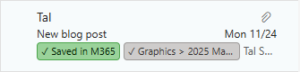
This gives you immediate visibility in your inbox, allowing you to:
-
Quickly see which emails were saved
-
Identify exactly where each email was stored
-
Filter your inbox to show only emails saved to Microsoft 365 or emails saved to a specific location
This feature helps reduce duplicate saves, improves clarity, and makes email management more transparent for end users.
See What’s new in New harmon.ie 1.5 for more details.
Designed for the Way You Work in Microsoft 365
With version 1.5, New harmon.ie continues to refine the experience of managing emails and documents directly from Outlook—without disrupting existing workflows.
Whether you’re saving content to SharePoint libraries, Teams channels, or OneDrive folders, these improvements help keep project information organized, accessible, and easy to track.
Get Started with New harmon.ie 1.5
Version 1.5 is available now.
If you’re already using New harmon.ie, you’re automatically upgraded to version 1.5.
If you’re exploring New harmon.ie for the first time, this release makes it easier than ever to keep emails and documents organized across Microsoft 365. Try it now for free, no credit card required.