New harmon.ie
Automatically Save Email Headers in SharePoint Columns Using New harmon.ie
harmon.ie’s email header mapping saves key email information, such as the subject, sender, recipients, and date, as metadata when users save an email to SharePoint or Teams. Emails are then easier to organize, classify, and find, without manual tagging.
How to set up email header mapping in New harmon.ie?
An admin chooses one of three setups. They differ in who creates the email content type in each library: the admin, or harmon.ie on behalf of the user who saves the email.
| # | Setup | The admin | harmon.ie | Users need Edit permission in the SharePoint site |
|---|---|---|---|---|
| 1 | A custom content type in every library For organizations that don’t give users Edit permission. |
Creates an email content type, adds it to every library, and configures custom email header mapping. | Maps the email headers into the admin’s columns. | No |
| 2 | A custom site content type, added to libraries by harmon.ie For organizations that use their own content type and let users edit their sites. |
Creates an email content type at the site level, configures custom email header mapping, and turns on Create the email content type for SharePoint. | Adds the content type to each library that doesn’t have it, with an Emails view. | Yes |
| 3 | harmon.ie’s default content type For a quick setup with harmon.ie’s columns. |
Turns on Create the email content type for SharePoint. It is on for Teams by default. | Creates the content type in the site, with the default columns, and adds it to each library that doesn’t have it, with an Emails view. | Yes |
What harmon.ie does when a user saves an email
When a user saves an email to SharePoint or Teams, New harmon.ie assigns the email content type to the email and maps the email headers into its columns. When Create the email content type is on for the destination and the user has at least Edit permission in the SharePoint site, harmon.ie also adds what’s missing:
- The library has no email content type: harmon.ie adds one, with the default columns and an Emails view.
- Message ID and Email Thread columns: harmon.ie adds them if they are missing from the content type.
Otherwise, an email saved to a library without an email content type is saved without email header mapping.
Admins turn Create the email content type on or off per destination in the Admin tab. It is on for Teams and off for SharePoint by default.
Email metadata columns created by default email header mapping
| Email Column Display Name | Column Internal Names | Type | Description |
|---|---|---|---|
| Attachments | hrmV2HasAttachments | Single line of text | Indicates if the message has attachments. The default value should be “No” |
| CC | hrmV2Cc | Single line of text | Carbon copy recipients |
| Conversation Topic | hrmV2ConversationTopic | Single line of text | The original subject line, without prefixes such as “RE:” and “FW:” |
| Email Thread | hrmV2InternetConversationID | Single line of text | Identifies the email thread. Can be used to group emails in a SharePoint view. |
| From | hrmV2From | Single line of text | Sender’s address |
| Message ID | hrmV2MessageID | Single line of text | A unique identifier for the message. Required for shared categories, which show users that a colleague already saved an email. |
| Received | hrmV2Recieved | Date and Time | Received date and time |
| Subject | hrmV2Subject | Single line of text | Email subject line |
| To | hrmV2To | Single line of text | Primary recipients |
harmon.ie’s Emails view
harmon.ie creates the Emails view only when it adds the email content type to a library. The view contains these columns:
- Name: File name as saved by harmon.ie
- Attachments
- To
- From
- Received
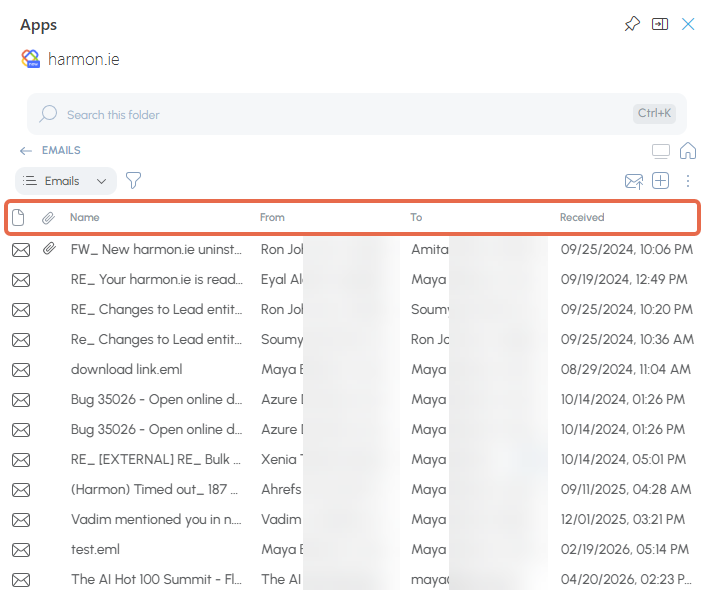
You can edit the view and its columns in SharePoint.