Attach SharePoint Files to Email from Outlook

No browser. No downloading. Just Outlook.

Attaching a SharePoint file to an email takes too many steps. Open a browser. Find the SharePoint site. Locate the file. Download it. Switch back to Outlook. Attach it. Most people skip the whole process and email an old copy from their desktop instead — so no one ends up with the right version.
Attach Microsoft 365 files to Outlook emails

How harmon.ie attaches SharePoint files to email — from inside Outlook

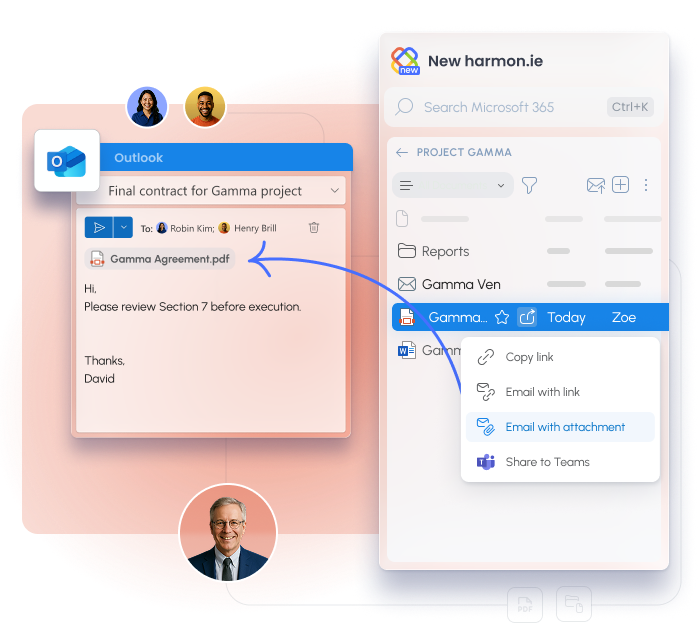
harmon.ie brings SharePoint, Teams, and OneDrive into a sidebar inside Outlook. When you’re composing an email, your entire Microsoft 365 file library is right there — browse, click Share, and add the file or link to your message.
 
No switching apps, no downloading, no outdated copies.

harmon.ie sidebar in Outlook
All your Microsoft 365 locations, inside Outlook

Browse your entire Microsoft 365 library without leaving Outlook

The harmon.ie panel shows your SharePoint libraries, Teams channels, and OneDrive folders right alongside your compose window. Find any file without opening a browser or a second window.

Add as attachment in one click

locate the file in the sidebar, click Share, and choose Add as attachment. It lands in your email instantly — no saving it to your desktop first.

Share as a SharePoint link instead

Click Add as link to send a live SharePoint URL rather than a file copy. The recipient opens the latest version every time, not a snapshot from three revisions ago.

Recipient access confirmed before you send

When you add a SharePoint link, Outlook checks whether each recipient has access to the file before the email goes out. No “permission denied” replies after it’s already sent.

Attach or share multiple files at once

select several files in the sidebar and add them all as attachments or links in one action. No repeating the process file by file.

Secure and certified

No external servers. Your content never leaves your environment.

Microsoft 365 App Compliance Program completed. ISO 27001 certified.

What enterprise teams say

BearingPoint logo

3,500 BearingPoint consultants in 15 countries were skipping SharePoint entirely — sharing files was too cumbersome. With harmon.ie inside Outlook, that friction disappeared — 4 out of 5 users chose it over direct SharePoint access.

With harmon.ie, there are no more collaboration barriers.

Anke Riesner

IT Director, BearingPoint

Canada Post deployed harmon.ie to 64,000 employees. The reason it worked: users didn't have to change how they work. SharePoint came to them — inside Outlook, the tool they were already in all day.

“harmon.ie is a dream come true because folks say, ‘Hey, I can live in Outlook. I don’t even have to worry about that other stuff.

Alexandre Singh

ESDC Executive Director Business Solutions and Information Management

Proven at enterprise scale

360000 +
working from Outlook at a single deployment
Bosch
95 -100%
SharePoint adoption in year one
Aon
2,000 consultants
2 M
Email storage savings, per year
Aon
70 %
Faster email and document management
Bosch

The file is in SharePoint. The email is in Outlook.

harmon.ie connects the two.
Email Management that Works
Want to Learn More?

Let us show you how harmon.ie streamlines email management from Outlook into Microsoft 365.